Managing Scheduled Reports
You can manage your campaign scheduled reports through the Scheduled Reports section within the Campaigns module. A table displays all your scheduled reports with options to edit or delete them.
Accessing Scheduled Reports
To manage your scheduled reports:
- Navigate to Dialer Results or Dialer Campaigns in the Campaigns module.
- Open the relevant Dialer Result or Dialer Campaign.
- Go to the Records tab.
- From here, you can view and manage the scheduled reports associated with that Records view.
Using Filters
To help you find specific scheduled reports, you can use the Show Filters button:
- Click the Show Filters button located above the table.
- This will reveal filter options that allow you to narrow down your scheduled reports by criteria such as:
- Report Status: Active, Inactive, Paused
- Frequency: Daily, Weekly, Monthly, Quarterly, Annually, Custom
- Report Type: Dialer Results Records, Dialer Campaign Records
- Date Range: Filter by when the report was created or last run
- Format: CSV, XLSX, PDF
- Apply your desired filters to see only the reports that match your criteria.
- You can clear filters at any time to return to viewing all scheduled reports.
Editing Scheduled Reports
Each scheduled report in the table has a three-dot menu (also known as a "more options" menu). To edit a scheduled report:
- Locate the report you want to edit.
- Click on the three dots menu located next to the report.
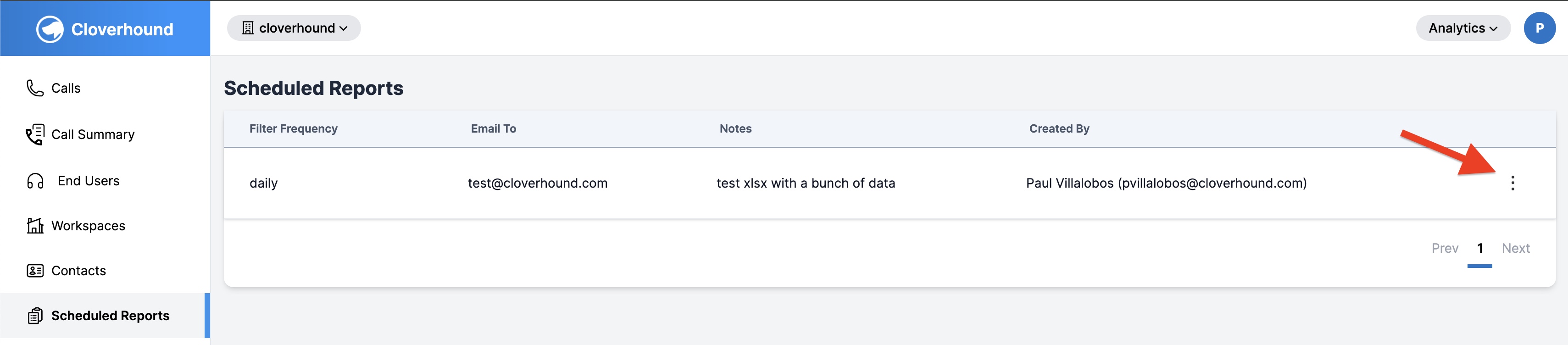
- Select the Edit option from the dropdown.
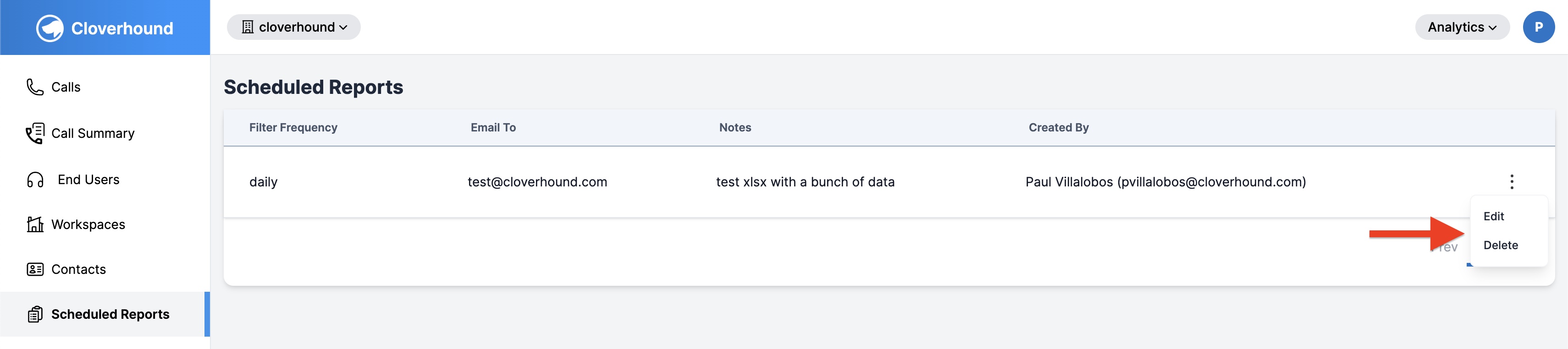
- You'll be redirected to the form where you can update the report's details, such as frequency, format, recurrence, and other settings.
- Make your changes and save the updated report.
Deleting Scheduled Reports
To delete a scheduled report:
- Locate the report you want to delete.
- Click on the three dots menu located next to the report.
- Select the Delete option from the dropdown.
- A confirmation prompt will appear asking if you're sure you want to delete the report.
- Confirm the deletion to remove the scheduled report.
⚠️ Note: Deleting a scheduled report is permanent and cannot be undone. Make sure you no longer need the report before deleting it.
By managing your scheduled reports, you can keep your reporting aligned with your campaign operations, making adjustments or removing reports as your needs evolve.